
A Flippin Flip Clock - Google Play
You'll be able to see results in few seconds.
Publisher Description
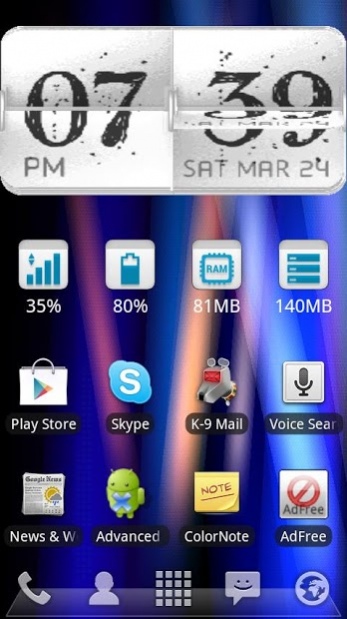
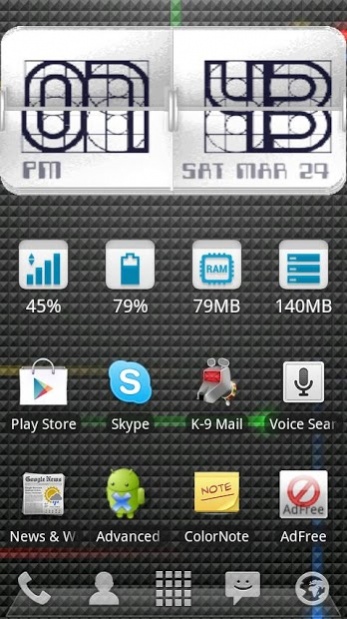
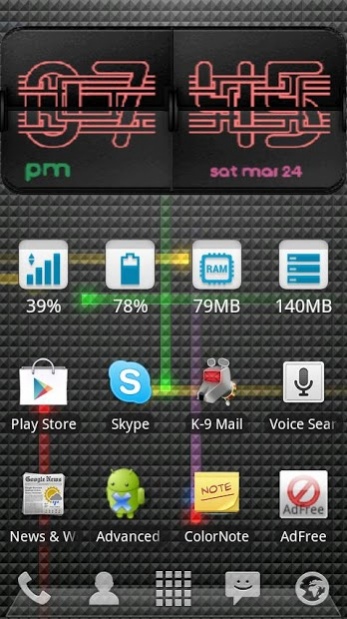
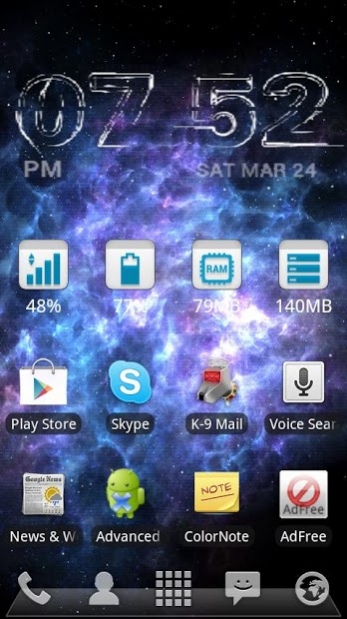
YES! its actually a WIDGET, and it FLIPS! (And now it Vibrates, Clicks, Kuck-Koo's" AND reads out the time!
It is not a wallpaper, or a video to play. Your animated wallpapers will continue to work in the background as usual. And you can chose which wallpaper, independently of this widget.
It was built from the ground up to not consume much battery. It does not come up on my battery usage list, which shows down to 2%. However, I do have a tenancy to keep my display on to watch the clock flip, and the screen being on does drain the battery... resist this habit and you should not notice any battery effects.
There are three different backgrounds, including transparent, and will all the other configuration options there are over 1 million different variations to how the clip clock will actually look on your home screen, and its all up to you through configuration.
This widget is a Flip-Clock, it does not have weather. By selecting this development path, I have managed to minimise the permissions to basically none. :) Depending on interest, I may add internal weather support in the future.
To "demonstrate" the flip, click on the right (the minutes), and to configure the woidget, click on the left (ie the hour display), or start the application from your "App Draw"
When I first purchased an Android phone, I was surprised that there were no flip clock widgets that actually flipped, but after building one, I now understand why! :-/
The widget is currently only for screens of at least 480 pixels wide or more. Download and test the demonstration version BEFORE purchasing the full version to test if it works on your specific device and launcher combination. Due to the tricks employed to get the flip working, it may not work on all devices and launchers out there. :(
A few of my favorite configurations are:
Black with "Messy Things" font
Black with "Entangle" font
White With "Messy Things" font
White with "Leonardo Blue" font
White with "Handwritten JR" font
Transparent with "Fanzine" font
** PHYSICAL MODE
I have added a new optional "Physical Mode" to enable the features of
* Vibrate when the flap falls
* Play a sound when the flap is "Released"
* Play a sound when the flap falls into place
* Read out the time using the Text To Speech Engine
KEYWORDS: Flip Clock, Widget, Animation, Animated, Configurable, Skin, Speak Time, Vibrate, Sound, Kuck-Koo, KooKoo, Read Time
About A Flippin Flip Clock
The company that develops A Flippin Flip Clock is SickPenguin. The latest version released by its developer is 1.0 .
To install A Flippin Flip Clock on your Android device, just click the green Continue To App button above to start the installation process. The app is listed on our website since 2013-04-21 and was downloaded 0 times. We have already checked if the download link is safe, however for your own protection we recommend that you scan the downloaded app with your antivirus. Your antivirus may detect the A Flippin Flip Clock as malware as malware if the download link to sickpenguin.widget.flippinflipclock is broken.
How to install A Flippin Flip Clock on your Android device:
- Click on the Continue To App button on our website. This will redirect you to Google Play.
- Once the A Flippin Flip Clock is shown in the Google Play listing of your Android device, you can start its download and installation. Tap on the Install button located below the search bar and to the right of the app icon.
- A pop-up window with the permissions required by A Flippin Flip Clock will be shown. Click on Accept to continue the process.
- A Flippin Flip Clock will be downloaded onto your device, displaying a progress. Once the download completes, the installation will start and you'll get a notification after the installation is finished.
Program Details
System requirements
Download information
Pricing
Version History
version Macaroni
posted on 2013-04-21
Version 8
* Fix FC / issue with redraw
Version 7
* Reduced "False Positives" on flip & reading out time
Version 6
* fixed force close on some devices for "Physical Mode"
Version 5
* Added "Physical Mode": Add Vibration, Sound and Speak Time at selected intervals
* Reads Out Time at selected intervals (1, 5, 10, 15, 20, 60 minutes), even when phone is asleep!
* Added option to vibrate when either or both flaps fall (ie vibrate on minute and/or hour)
* Improved time tracking
version Macaroni
posted on 2013-04-20
Several fixes and updates
Disclaimer
Official Google Play Link
We do not host A Flippin Flip Clock on our servers. We did not scan it for viruses, adware, spyware or other type of malware. This app is hosted by Google and passed their terms and conditions to be listed there. We recommend caution when installing it.
The Google Play link for A Flippin Flip Clock is provided to you by apps112.com without any warranties, representations or guarantees of any kind, so access it at your own risk.
If you have questions regarding this particular app contact the publisher directly. For questions about the functionalities of apps112.com contact us.
